
User accounts can be configured so they are unable to login to the application. This configuration might be chosen so that items (i.e. Boxes and Files) can be transferred to Users, but those users would not be able to login and use application licenses or request the wrong items.
To prevent a user from being able to login:
-
Ensure you are logged in as an account with permission to edit User records.
-
Browse to the Users page and use your preferred search methods to locate the correct User account.
-
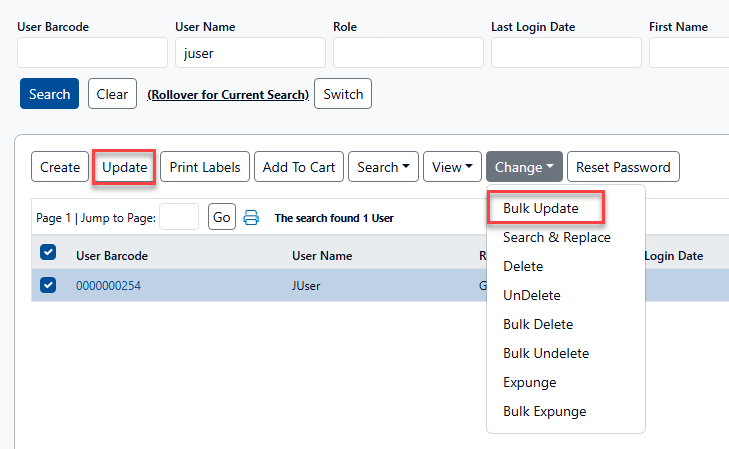
Select the desired User account(s) and click Update. Multiple User accounts can be disabled simultaneously by using Bulk Update.
-
On the Update page, check the box for the Login Disabled property. Then click Update.
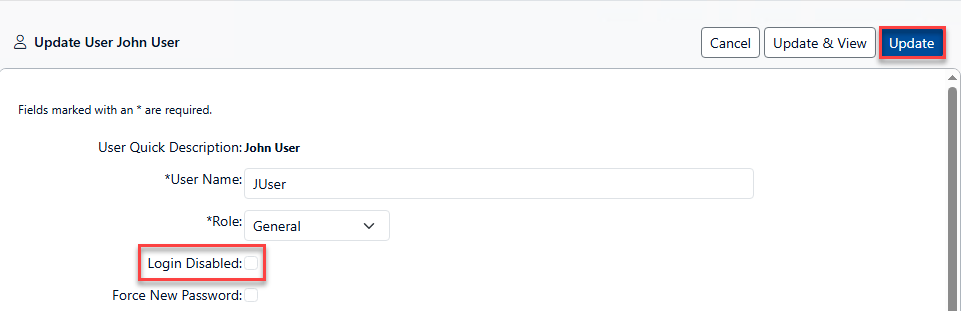
Due to differences in application implementations and configurations, the Login Disabled property may appear in a different location, or with a different caption, than indicated in the image above.
-
The user is now prevented from logging in to the application.