The Quick Description is a concatenated data description for an item type used to reference records from that data tab throughout the application. The Quick Description may be constructed using multiple data fields and/or text.
To change an item type’s Quick Description, click the Quick Description Fields link in the Configuration section of the application Admin page. This displays the Configure Quick Description Field page.
-
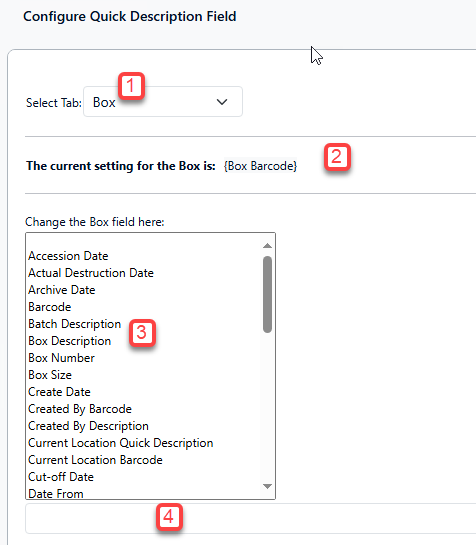
Choose the desired item type in the Select Tab dropdown.
-
The current configuration for this item type’s Quick Description is displayed below the item type selection.
-
Select the data fields you want to include in the Quick Description from the central pane.
-
Any selection you make (and save) will replace the existing Quick Description configuration.
-
-
As you select fields, they are automatically added with curly braces to the new Quick Description configuration shown below the field selection pane. Text separators (e.g. hyphens, or commas) can be used between fields to improve readability.
-
Click the Update button when you have finished configuring the Quick Description or click Cancel to discard any changes.