Before you can perform incremental classification, you must ensure that certain Documentum Audit Trail event objects are present. Perform the following steps to enable these event objects:
-
Log into Documentum Administrator as a Superuser.
-
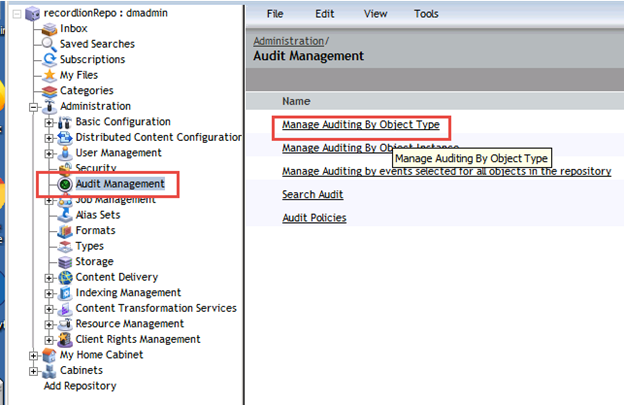
Select Audit Management from the left navigation pane.
-
Select Manage Auditing by Object Type on the Audit Management screen.
-
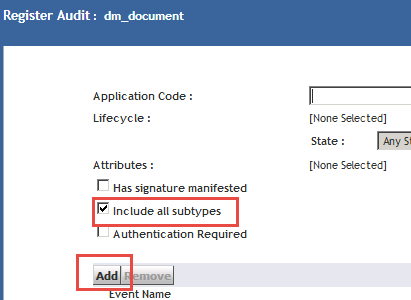
Select dm_document as the document type. NOTE: this MUST be configured at the dm_document level and NOT at the dm_sysobject level. While inheritance would result in audit events getting applied to dm_document, the connector requires an explicit definition of auditing for the dm_document.
-
Click Add to add audited events. Ensure that the "Include all subtypes" option is checked.
-
Add the dm_destroy and dm_prune events for auditing.
-
Click Save to save the settings and close the dialog.
-
Select Job Management from the left navigation pane.
-
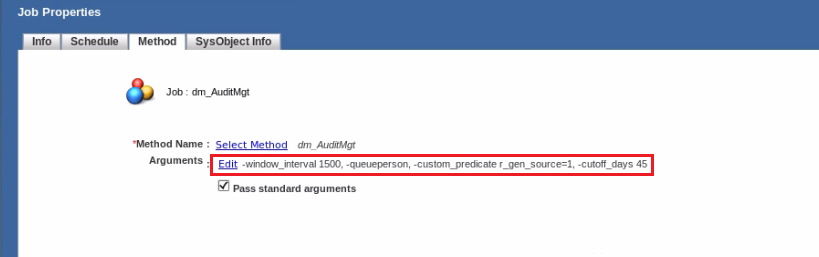
Select Jobs > dm_AuditMgt on the Jobs screen. Next select Properties > Method tab > Edit > set the cutoff_days value to 30 or higher.
-
Click OK to save, and then click OK to close the dialog.