
Gimmal Records Management may be deployed on-premise to ensure the strictest record security and have complete control of your environment. This section will walk you through an on-premise deployment of the software.
System Requirements
Before you install Gimmal Records and any of its components, verify that your system meets or exceeds the following requirements:
-
Windows Server 2016 or later (x64)
-
.NET Framework 4.8 (not .Net Framework 4.8.1)
-
.NET Framework 3.5
-
Internet Information Services 7 or later
-
PowerShell 3+
-
250 MB Disk Space for software and 200 MB for log files
HTTPS Requirement: Gimmal Records requires using HTTPS with Gimmal Records for any version of the software.
Gimmal Records requires that you enable Transport Layer Security (TLS) 1.2, which provides communications security for client/server applications.
To enable TLS 1.2, if not already present (e.g., in default Windows Server 2016), you must add the following Windows registry settings to the Gimmal Records Core server(s) and the servers of any Gimmal Records connectors that you are using, and then reboot your system.
-
HKLM:\SOFTWARE\Microsoft\.NETFramework\v4.0.30319 "SchUseStrongCrypto"= dword:00000001
-
HKLM:\SOFTWARE\Microsoft\.NETFramework\v4.0.30319 "SystemDefaultTlsVersions"= dword:00000001
-
HKLM:\SOFTWARE\Wow6432Node\Microsoft\.NETFramework\v4.0.30319 "SchUseStrongCrypto"= dword:00000001
-
HKLM:\SOFTWARE\Wow6432Node\Microsoft\.NETFramework\v4.0.30319 "SystemDefaultTlsVersions"= dword:00000001
Note that some operating systems require additional steps to enable TLS 1.2. For more information, see Microsoft's TLS documentation To verify that your operating system supports TLS 1.2, read the Support for TLS 1.2 section of Microsoft's documentation.
Database Requirements
Effectively managing a database for on-premises Gimmal Records requires familiarity with collation, maintenance plans, recovery models, backups, and techniques for minimizing file system fragmentation, such as creating a database file large enough for any anticipated growth.
SQL Server Versions
-
SQL Server 2016 or later
If it is necessary to upgrade from an older version of SQL Server (pre 2016), after you upgrade SQL Server and BEFORE installing the latest version of Gimmal Record Management, verify the SQL Compatibility Level of the “InformationLifecycle” database by running the following query:
select compatibility_level from sys.databases where name = 'InformationLifecycle'
This query should return a minimum value of 130. If this is not the case, refer to the following Microsoft documentation for updating the compatibility level here.
Please note: The database name for your installation may vary from the example shown.
Sizing
The following table shows database sizing estimates in GB.
|
Data File |
1m |
25m |
50m |
100m |
|---|---|---|---|---|
|
Information Lifecycle Data |
25 |
600 |
1200 (1.1 TB) |
2400 (2.4 TB) |
|
Information Lifecycle Log |
15 |
50 |
100 |
200 |
|
Temp Data |
100 |
100 |
100 |
100 |
|
Temp Log |
10 |
10 |
10 |
10 |
Note: The "m" in the Data File headings represents millions.
Collation
Gimmal Records requires a case insensitive collation as a minimum system requirement for the SQL Server database. The default EN-US collation is SQL_Latin1_General_CP1_CI_AS, which meets the Gimmal Records minimum system requirements. Guidance on collations is available here.
Maintenance for Databases
The Database Administrator should be familiar with tuning and monitoring a SQL Server instance. If no efforts are made to track database performance over time, it becomes highly likely that database performance may be negatively impacted.
These monitoring efforts should be documented in reports containing empirical information about the database. From these reports, it is possible to construct and maintain a well-designed SQL Server maintenance plan. A SQL maintenance plan is highly recommended for any Gimmal Records implementation.
The plan should address, but not be limited to, the following:
-
Index Fragmentation
-
Transaction Logs
-
Backups/disaster recovery
-
VerifyBackups
-
Maintenance Plan Cleanup
Database administrators can run the stored procedure ProcBlock_RebuildIndexes to rebuild Gimmal Records indexes if they wish to improve query performance if they experience slowness.
Manager Web Prerequisites
Prior to installing the Manager Web, you must configure Windows Roles and Features as follows:
Roles
-
Web Server (IIS)
Features
-
.NET Framework 3.5 Features
-
.NET Framework 3.5
-
-
.NET Framework 4.5 Features
-
WCF Services
-
HTTP Activation
-
-
Note: .Net Framework versions 4.8, 4.7, and 4.6 will include the 4.5 features. See screenshot for a Server 2022 example.
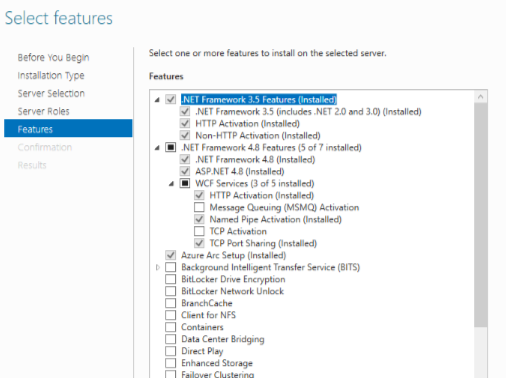
Note: .Net Framework 4.8.1 is not supported