
The Connector has three jobs that are configurable. Each job can be run on a recurring schedule with an option to run it on-demand to override the schedule. Finally, each job can also be disabled to prevent it from running at all.
-
Custom Classification
-
Retention
-
Incremental Classification
Custom Classification Job
This job is used to recursively to classify existing documents within the selected root folders of your Box account and bring them into Gimmal Records (called ‘recordization’). Typically, this job would only be used once when the Connector is initially deployed in your Box account or if additional root folders need to be classified.
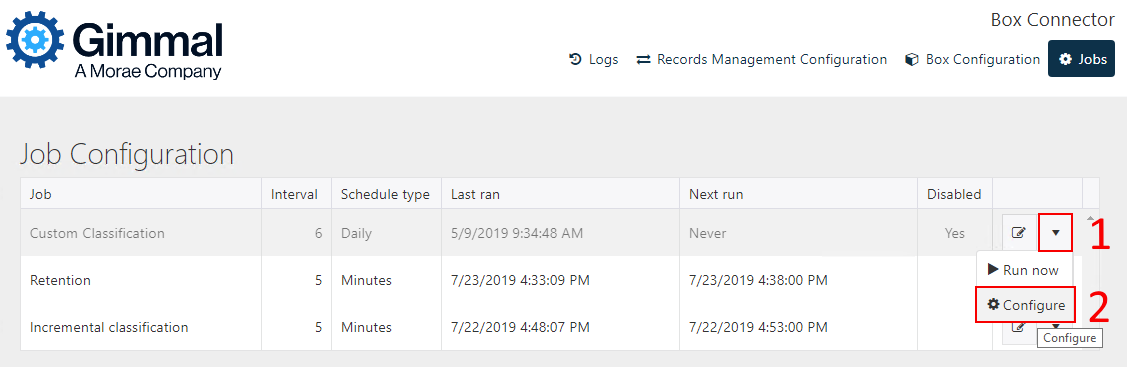
To configure the Custom Classification Job, first select Configure from the drop-down.
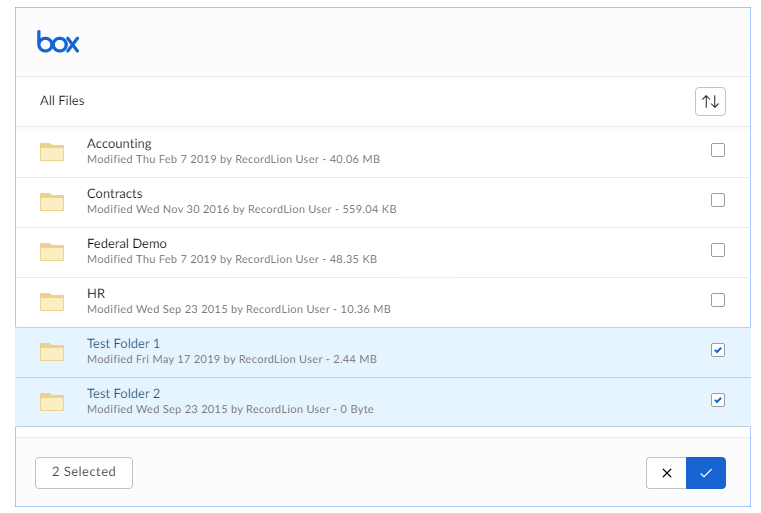
Once the Box folder selection window opens, select the listed Box root folders to be included in the crawl.
Once the custom classification job is enabled, you should run it on demand by clicking the “Run now” option on the job action menu.
Because the custom classification will crawl all existing folders every time the job runs (an undesirable behavior), Gimmal recommends keeping the Custom Classification job disabled until you are ready to run the initial job or add new content.
Once the job is finished running, the best practice is to disable it again, as the Incremental Classification job (see below) is responsible for processing document changes once they have been added to Gimmal Records. The job is disabled by default and has a default interval of six days.
If you are only scoping select root folders to include for management in Gimmal Records (rather than all Box contents), the Alternate Administrator Account must first be set up as a user in Box Administration with the Collaboration Folders set to match those configured as part of Custom Classification.
Retention Job
The retention job asks the Gimmal Records service for any action items that need to be processed by the Box Connector. The result is that the appropriate action is applied to the document inside your Box environment. The default interval for this job is 5 minutes. The currently supported action items are:
-
Lock item (declare record, permanent, and legal holds)
-
Unlock item (undeclare record and legal holds)
-
Dispose of and delete
If using Box Governance, the retention job will use Box's legal hold functionality to lock items. Items on legal hold will not have a graphical indicator. There is no option to permanently delete an item on legal hold, only to “Restore”.
Naming box legal holds
The default name for legal holds is “Gimmal Record”. If “Release” is selected for an active legal hold, the hold disappears, and all the documents are released from the hold. However, that name cannot be reused for new legal holds.
Incremental Classification Job
The incremental classification job is one of the most important jobs in the Connector. It is responsible for identifying any documents that have been created, updated, or deleted in your Box account since the last time the job ran. Once these documents are identified, the Connector sends the appropriate change notification (create, update, or delete) to the Gimmal Records Service for the Record. The default interval for this job is 5 minutes.
When initially adding data into Gimmal Records using Custom Classification for the first time, we recommend turning off incremental classification until the data has been ingested.